Made for Apple Watch

Less phone.
More flow.

Built around your next set
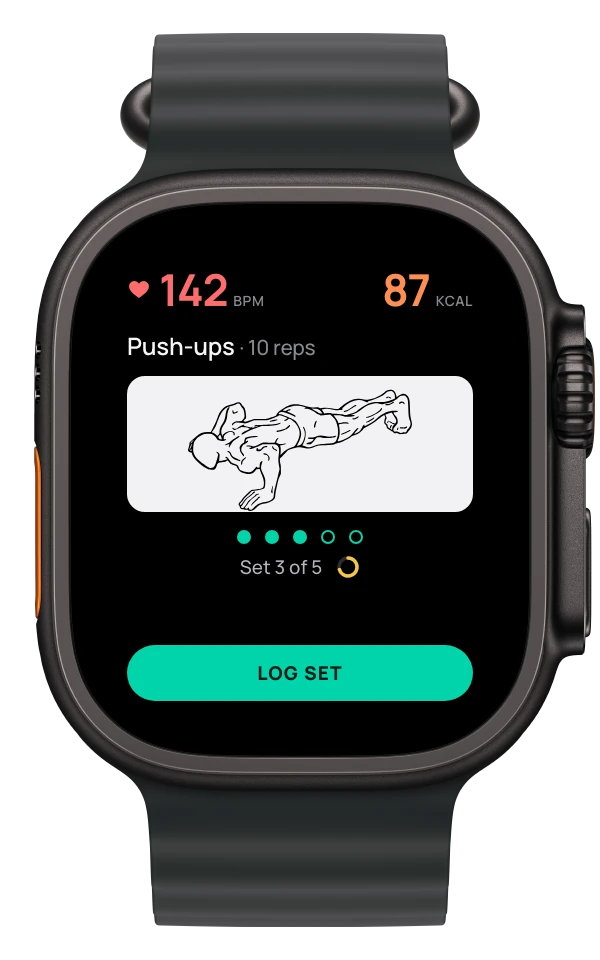
Push-ups • 10 reps
In your workout. Out of your way.

Your exercises, sets, and rest.
Right on your wrist.

Get early access

Free · No account · No ads or trackingNeeds an iPhone and an Apple Watch

A little less screen time.
A little more you time.
Find your rhythm Apple Watch + iPhone
Designed for the gym floor

Between sets

Your phone wasn’t made
for the gym floor.

  1. Before every set

    Unlock. Find the note. Scroll to today. Again, with sweaty hands.

  2. Mid-set

    Was that eight reps or ten? Third set, or fourth?

  3. Rest

    Ninety seconds of rest. Twelve minutes of scrolling.

FlowFit puts the next set on your wrist, so your phone can stay in your bag.

01 / The experience

A whole session.
One simple rhythm.

Follow the move. Log your set. Catch your breath.
FlowFit keeps the next step close.

01 — LIFT

Know what’s next.

Your exercise, your reps, and a moving guide. Everything you need for the set in front of you.

Push-ups3 sets × 10 reps
02 — REST

Take your breather.

Tap Log Set and your rest timer starts. A countdown on your wrist keeps the workout moving.

Automatic rest10 seconds
03 — REPEAT

Back in the flow.

Your next set is ready when rest ends. Finish the exercise and FlowFit moves on with you.

One tap to logOn to the next set

That’s the whole rhythm.

Try it on your wrist

Free · No account · No ads or trackingNeeds an iPhone and an Apple Watch

YOUR SESSIONSET 1 / 3
Apple Watch showing an interactive FlowFit workout preview
142 87
Push-ups • 10 reps

02 / The exercises

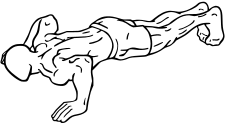
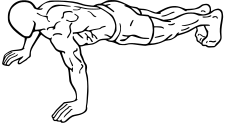
See the move.
Then make it.

A moving reference for the exercise in front of you. Built into the app, ready when you are.

275exercises across
7 muscle groups.
  • Arms 90
  • Legs 61
  • Chest 43
  • Shoulders 32
  • Back 27
  • Core 18
  • Cardio 4
CHEST · PUSH-UPS

03 / The plan

A little planning.
A week of purpose.

Choose your focus. Pick your exercises. Set your reps. Build your week on iPhone and take it to the gym on your watch.

Plan once. Train all week.Your day is ready. Now go train it.

Get FlowFit free

Free · No account · No ads or trackingNeeds an iPhone and an Apple Watch

Your plan syncs through your iCloud account.

Flow Routine

  • Today4 exercises
  • Tomorrow4 exercises
01

Ready without a signal.

Your saved plan, exercise guides, and timers stay on your watch. Train wherever you find your space.

02

Every session counts.

Follow heart rate and active calories as you train, then save your finished workout to Apple Health.

03

Open it. Get moving.

No FlowFit account to create. Your iPhone is there for planning; your watch is there for the workout.

FlowFit for Apple Watch

Make room
for your workout.

Join the TestFlight beta

Free · No account · No ads or trackingNeeds an iPhone and an Apple Watch

QR code that opens the FlowFit TestFlight beta
Scan with your iPhone camera

How the beta works

  1. Get TestFlightApple’s free app for betas, from the App Store.
  2. Accept the inviteOpen the link, tap Accept, then Install.
  3. TrainFlowFit installs on your iPhone, and the watch app comes with it.

Coming to the App Store. Beta testers get it first.

FlowFitFree beta · No accountJoin the beta

Get FlowFit on your iPhone

QR code that opens the FlowFit TestFlight beta

Point your iPhone camera here, then tap the link.

How the beta works

  1. Get TestFlightApple’s free app for betas, from the App Store.
  2. Accept the inviteOpen the link, tap Accept, then Install.
  3. TrainFlowFit installs on your iPhone, and the watch app comes with it.

If FlowFit doesn’t appear on your watch, open the Watch app on your iPhone and install it from Available Apps.

Open the invite in TestFlight

FlowFit is for iPhone and Apple Watch

Right now FlowFit runs on Apple Watch, with your plan built on iPhone. Know someone who trains with one? Send them the beta.